Time to ressurect this blog... again. A quick intro as to how I plan to move forward
Time to ressurect this blog… again. I originally had a plan to write 12 blogs this year, and that totally failed.
This time however, I’m going to change up how i post here. Basically, I plan to write short daily posts about things that are happening right now. A couple of hundred words, based on what’s in the news (mostly tech related), and a few other bits.
On top of this I plan to do a few other bits to spruce up the site, such as update the styling. I’m a fan of what I did for (now thoroughly broken) Thoughtstream.me. Maybe with a little more colour?
Ultimately, I hope to get something out of this experiment. Mostly, to improve my writing. But if I also make something people enjoy, that’s great too!
Lets get this out of the way; I like Apple Journal on iPhone. It’s pretty, works well (mostly), and it’s suckered me into writing every day. But it being iOS only made it a no go for me, until in 2025 Tahoe and the MacOS app was released. This was a year and a half after it rolled out on iOS. That’s a long wait!
So this post is about the MacOS version. And how, if it was good, this post wouldn’t exist.
Design
Apple and it’s legendary design. The Journal app was released with MacOS26 Tahoe. Tahoe started with a pretty luke-warm reception, which has only gotten colder as time has gone on. From the broken column view, to the crappy icons, to the window resizing issues, to the crazy number of different corner rounding, Tahoe hasn’t really followed in the footsteps of the many years of great, thoughtful, and thorough design choices and implementations. It’s been a mess.
And that mess certainly extends to the Journal MacOS app.
Weird UI problems
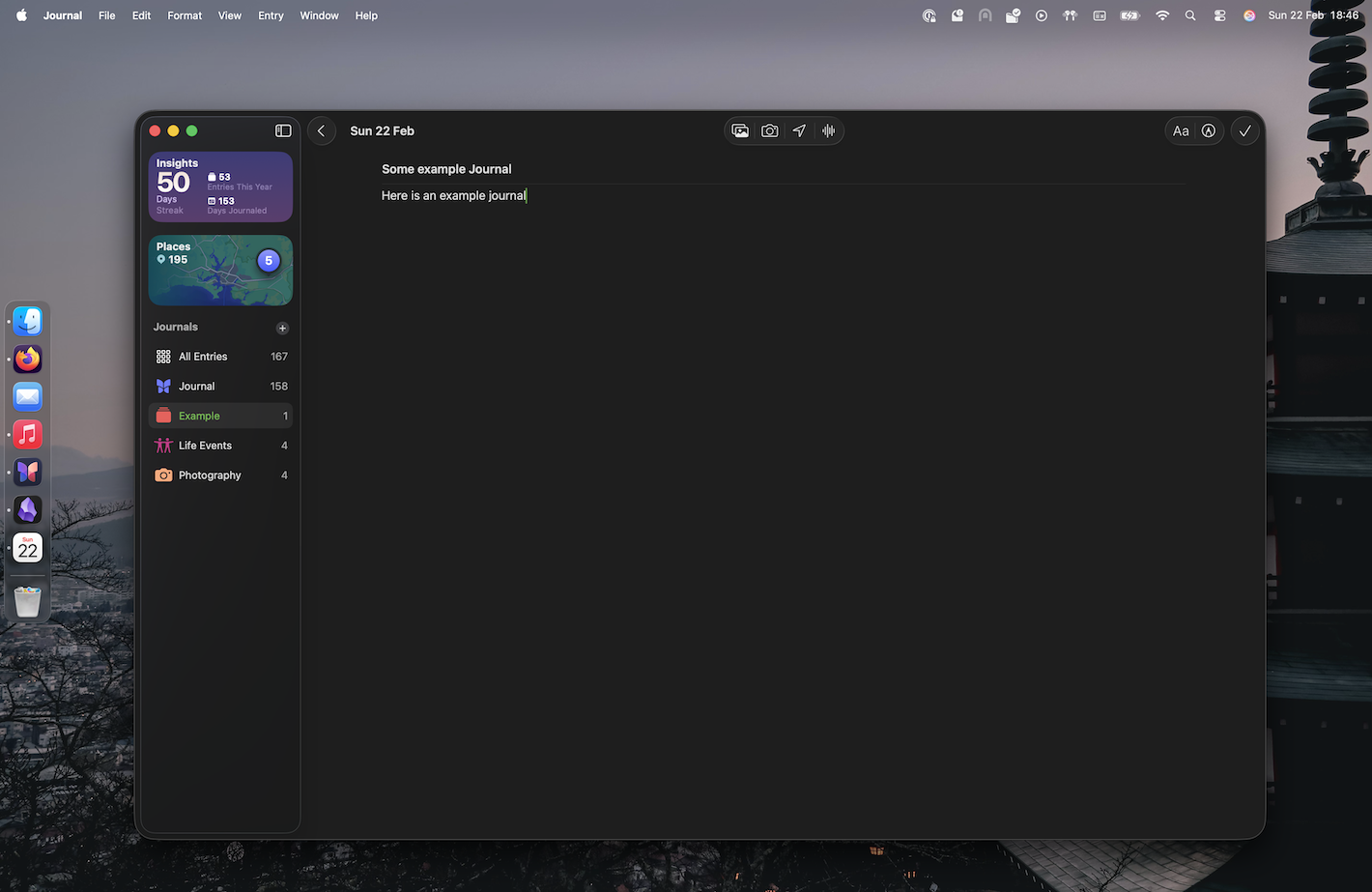
Initially, all looks good. Sure, it’s Liquid ass Glass but it’s clean and simple and looks fine.
Apple Journal on MacOS, with a wall paper of Japan
Full screen however:
Full screen view of a MacOS journal
What on earth is up with that black bar at the top? It’s just… there? Why? The search bar didn’t need this previously? Why now?
And it’s ONLY there on the List View. Not when reading or writing an entry.
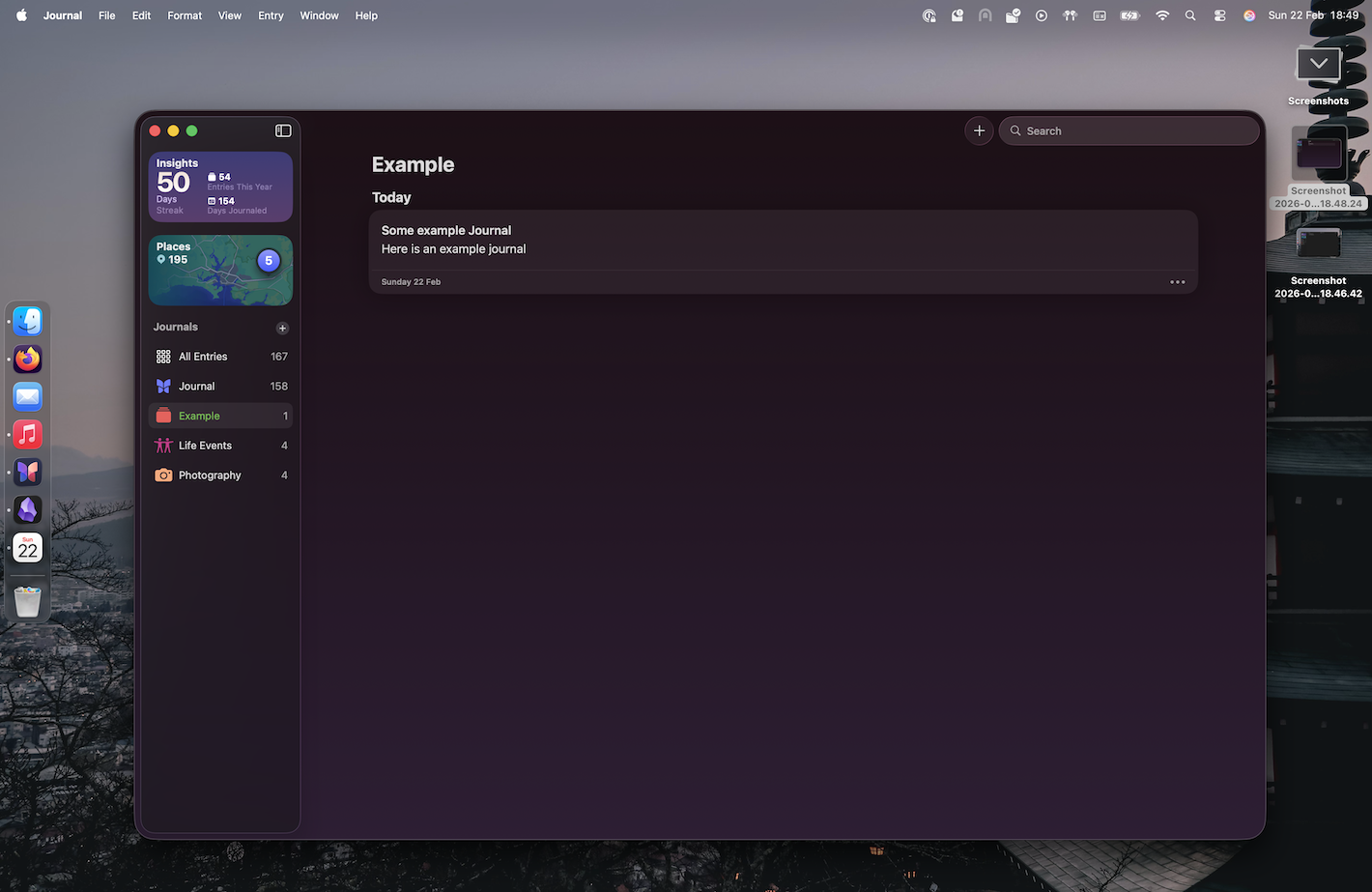
Here’s that same view when not full screen:
Apple Journal on MacOS, with a wall paper of Japan. You can see a list of journal entries
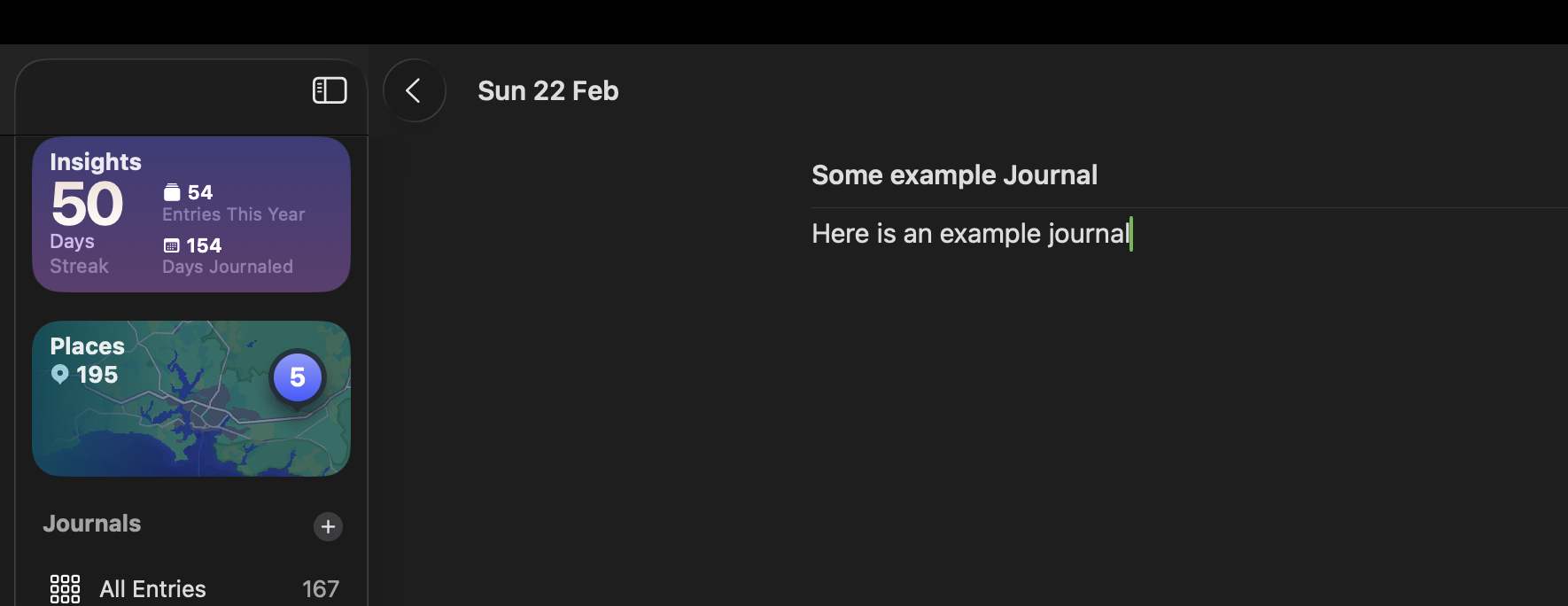
Editing mode however doesn’t get off totally free - there’s this weird lighter grey box located in the top left corner:
Full screen view of a MacOS journal, but just the top left corner. You can see a weird graphical error
How was this allowed?
I honestly don’t understand how any designers at Apple looked at that and went “Yep, ship it”. It’s so obviously a mess.
Feature parity with iOS
For some reason, the MacOS version is also missing a load of features. You can add photos, location, and so on. Good stuff.
But want to add music? iPhone only. Want to add a work out? iPhone only. The list goes on.
Adding a link is also a mess. Though, this is only semi supported on iPhone too; there you can only add a link via the Share button in Safari. Not while writing, or within the app. What an interesting product choice. One that I don’t really follow or understand.
I guess this can all be hand waved away as “they’ll bring more features over time”. Maybe? Honestly I’m not holding my breath.
Writing experience
The writing experience mostly ok… Until it isn’t. For some odd reason if you’ve got a lot of text on a page it starts to slow down and freak out if you hit the undo button. Sometimes it’ll wipe whole blocks of text when undo. Other times, just the last few words.
If you slam the “redo” after a whole block has disappeared, it’ll think about it for a second or two, and then it’ll reappear. We’re in 2026; a text editor slowing down and having issues with undo/redo is not ok. It’s amateurish, and should have easily been spotted in QA.
What is going on within the halls at Apple? Are folks just vibe coding these things and not actually using them?
The nit-picky
Now we’re onto the pedantic items! Lets rattle these off:
When creating a new journal, the keyboard isn’t focused on the title, even though the cursor looks like it is
Doesn’t support Markdown - though most Apple stuff doesn’t
It’s also generally lacking Heading and Subtitle etc.
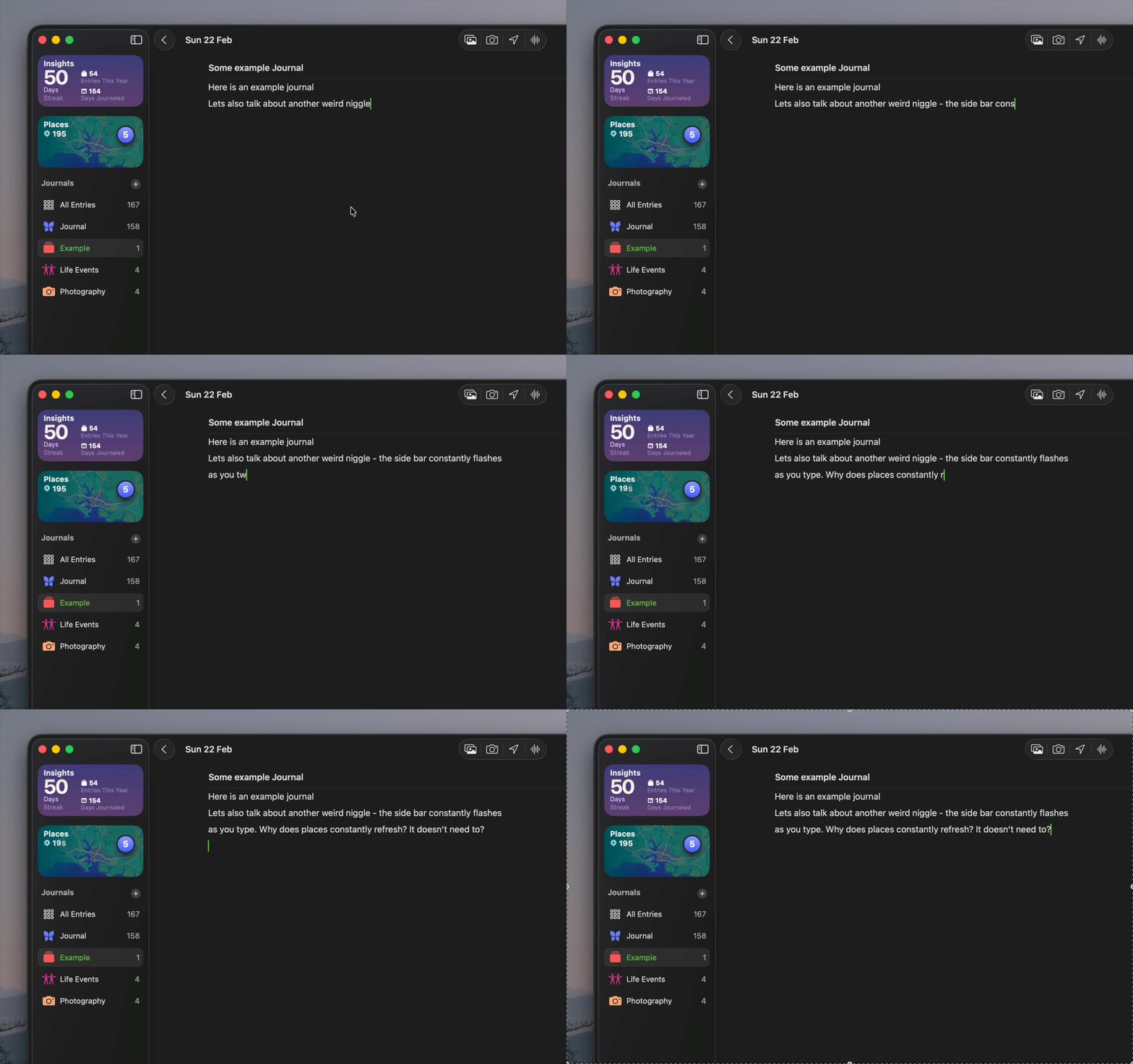
Constantly refreshing places on the side bar which is a constant distraction when writing
(see below for a GIF of this in action)
Weird scrolling lag when looking through your entries
Syncing is confusing and random. Can sometimes take hours for an entry to appear on MacOS from the iPhone, and vice versa
A gif of the weird issue where if you type the places number constantly updates
(I’m also very aware of how often I was miss spelling things 😅)
There’s probably a load more that I’ve forgotten about, or have yet to come across.
Apple Journal is hard to love
I really like Apple Journal. It does a lot of things right, from the simple interface, the ability to add content that’s relevant (music, photos etc), and there’s even a data export option.
It’s why it’s so frustrating that Apple, the company that’s supposedly obsessed with design, has made some veryweird bad choices with MacOS Journal. I would love for them to fix them. And actually test them. But Apple’s track record with this kinda of “extra app” hasn’t been great over the last few years. So I’m not holding my breath. But I will plead:
Part one of my experience in using Apple products for the last 12 months
I’ve been threatening promising this blog for months now; my experience with going “all in” with Apple.
In January this year, I decided to do something I’d previously swore never to do; buy an iPhone. Since then I’ve gone deep into the ecosystem. Headphones? Air Prod Pro 2. Streaming device? Apple T.V. 4K. Laptop? Macbook Air M3. Desktop? Mac Mini M4 Pro. Smart Watch? Apple Watch 3S. And of course, the aforementioned iPhone 16 Pro.
The Apple logo, but as if it’s centre is carved out of wood. The carving is of a tree.Source: Basic Apple Guy
So 2025 has been the year of Apple in the Winser household. But how has going from a fragmented collection of technology (Amazon Fire Cube, Samsung Fold 3, Fitbit, Linux) to a “walled garden” where everything supposedly “just works” ™️?
That’s a pretty big question, so I’m going to break it down into a few blogs. First, the hardware. I’ll go through each piece and share how I’ve found it. Next I’ll be focusing on the software. And finally, a round up and any extra thoughts.
Before we submerge into this lets get a little more of my background. I’m a software developer and have been writing code on MacOS for close to 10 years now. It’s my core development environment and I’m rather happy with it thank you very much.
I’ve not used “modern” Windows outside of using it to boot games and even then the last time I did was a while ago. I’ve installed Linux on loads of machines over the years, and most recently refurbished my old Macbook 2015 with Linux Mint.
Phone wise, I’ve had a lot of Android phones. My first was a HTC Desire in 2010. I’ve had Samsungs such as the S8 and Fold 3, the One + …er… One, a few more HTC’s, and even lesser know phones like the Wileyfox Phone (an obscure British company).
I’ve also had a few smart watches over the years, such as the Pebble Steal, Garmin Visio 2, and a couple of FitBits. All of these have been varying degrees of “good”, and only one has actually died on me (sorry Pebble).
As for streaming I’ve never trusted “smart” T.V.’s; they always have crappy software paired with underpowered CPU’s. So I’ve used Amazon Fire Sticks and, until recently, a Fire Cube.
Quite Comfort 2’s were the first set of ANC headphones I bought, and are still the ones I reach for whenever I’m travelling far (or working in an noise office). I’ve also had some Beats by Dr Dre ear buds; probably one of the nicest looking bit tech I’ve ever owned. I’m a real sucker for the Red.
I’ve never been embedded in any one ecosystem. All of these systems worked based on roughly standardised interfaces. Phones relying on WhatApp for messaging, T.V. on Wifi and HDMI, Headphones with Bluetooth. I was always pretty confident that as long as I saw a Bluetooth/WiFi/Whatever symbol, my tech would connect.
But what would happen if I did invest in tech that was designed to talk to each other? Tech that had been specifically built and tested to “just work” together?
The “leap of faith”
After months of pressure from my partner (who’s still got an iPhone 11 which is slowly dying) and family members, I decided to give up on Android and ditch my Fold 3 and replace it with an iPhone 16 Pro. My main reasoning was for the Camera. But also, I liked the style and look of the titanium body with a smaller and lighter form factor.
And with that, the “adventure” began.
So lets get started.
Hardware
You might be thinking that it’s a little weird to separate the hardware from the software, as they’re so intertwined. However with Apple I think it’s the right thing to do. I like to describe Apple as a hardware company that happens to do software. As I’ll get onto soon, the line between these two groups at Apple seems very defined.
iPhone
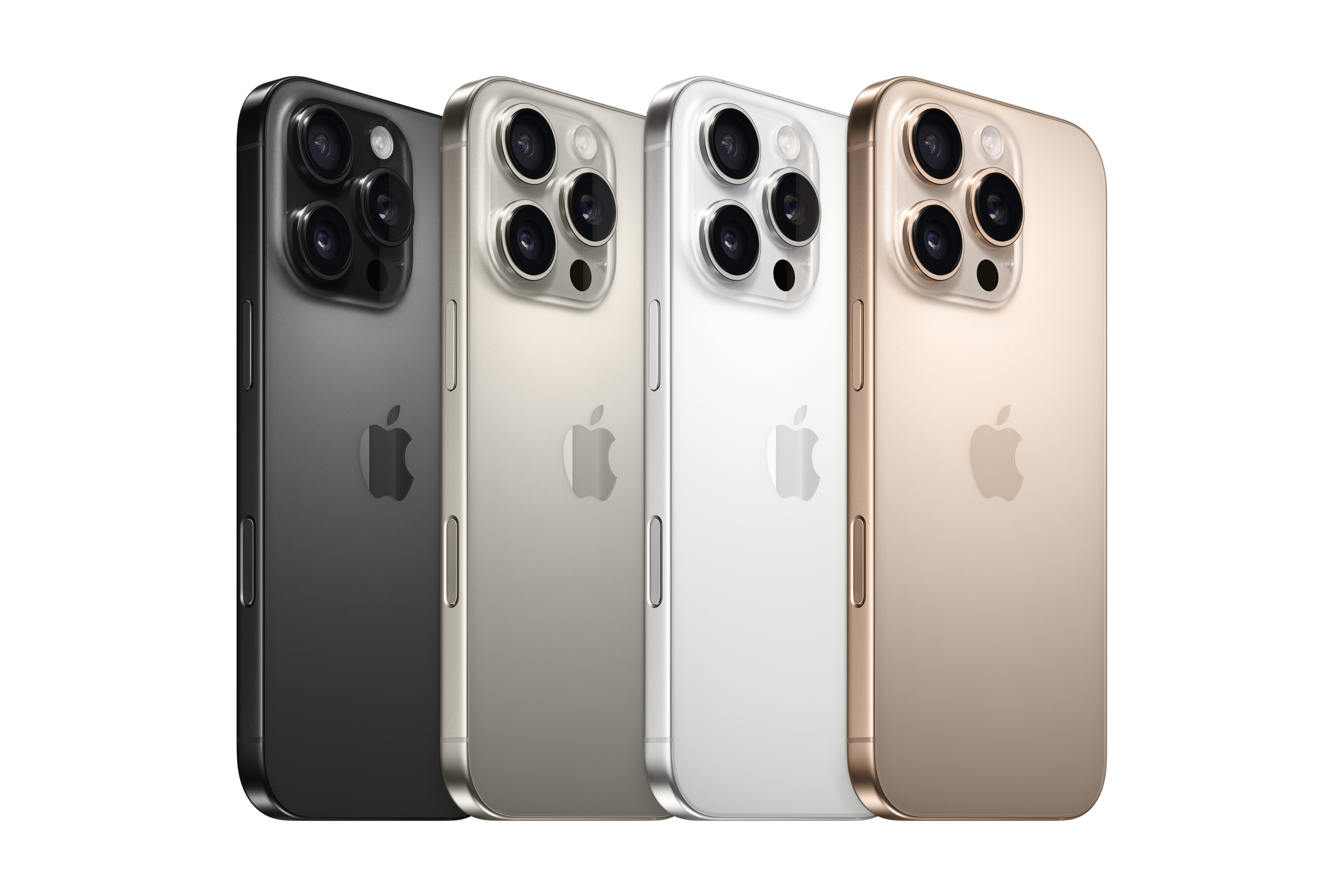
Lets discuss the place that really started the whole “Apple-ification” of my life. The iPhone 16 Pro is a pretty boring looking phone. Mines a dark grey, but weighs very little. it’s also a lovely size that fits well in my hand and doesn’t take up a lot of space in my pocket. It’s fine to watch youtube on, and the speakers are great for listening to podcasts while I’m doing the washing up.
4 iPhone 16 Pros, in a line showing the different colours availableSource: Apple
The screen is also lovely and at 120hz it glides a along without an issue. Still shocked that this was considered a “Pro” feature, considering budget Android devices have had it for years, but sure?
Overall there’s not much to comment on here. It’s an incredibly refined experience. The cameras are excellent with a nice wide and zoom lens. I’m also in the smallest group of iPhone users who actually really loves the new camera button. Just nice to use and makes photography that little bit easier.
I have some small niggles with the hardware, but they’re not huge.
The first is the table wobble. Placing it on its back means it wobbles something fierce. Placing it face first isn’t really an option, because A: scratches and B: it’s so slippery it’ll wonder off a table and smash into the ground.
Another aspect is heat dissipation. When taking photos or if you’ve got dodgy signal, the phone gets incredibly warm. The last time I felt this was years ago with older Android phones. So it was a bit surprising to experience this again. Of course they’ve now added a vapour chamber in the 17 Pro.
Oh and the “Plateau”. So the 17 Pro probably solves all of the above.
Macbook Air
So while I don’t really write reviews, I did write one for this one last year. “But wait, didn’t you say that the iPhone caused the “Apple-ification”, and you bought that this year” I hear you whisper sensually into my ear.
First, that doesn’t work on me.
Second, yes I did you smart person you. But I bought the Air to replace my very old personal Macbook 2015 model - the one that now has Linux on it. I wasn’t thinking about “ecosystem” and more thinking about side projects.
Anyway, I digress.
As i said in my review, the Macbook Air M3 is a fantastic machine. I would 100% recommend it to anyone. I love the keyboard, screen, trackpad, speakers. Pretty much everything. I can’t really fault it. If i was going to, I’d slap my hands away from my keyboard and say “If I’m going to criticise the lack of ports/screen/cooling, get the Macbook Pro”.
But seriously, the ONLY worry I have is the lack of fan. I worry in a few years that it will get uncomfortably warm was it attempts to keep up with 2029/2030 computing needs. I’ll write a blog if it does…
Apple T.V. 4K
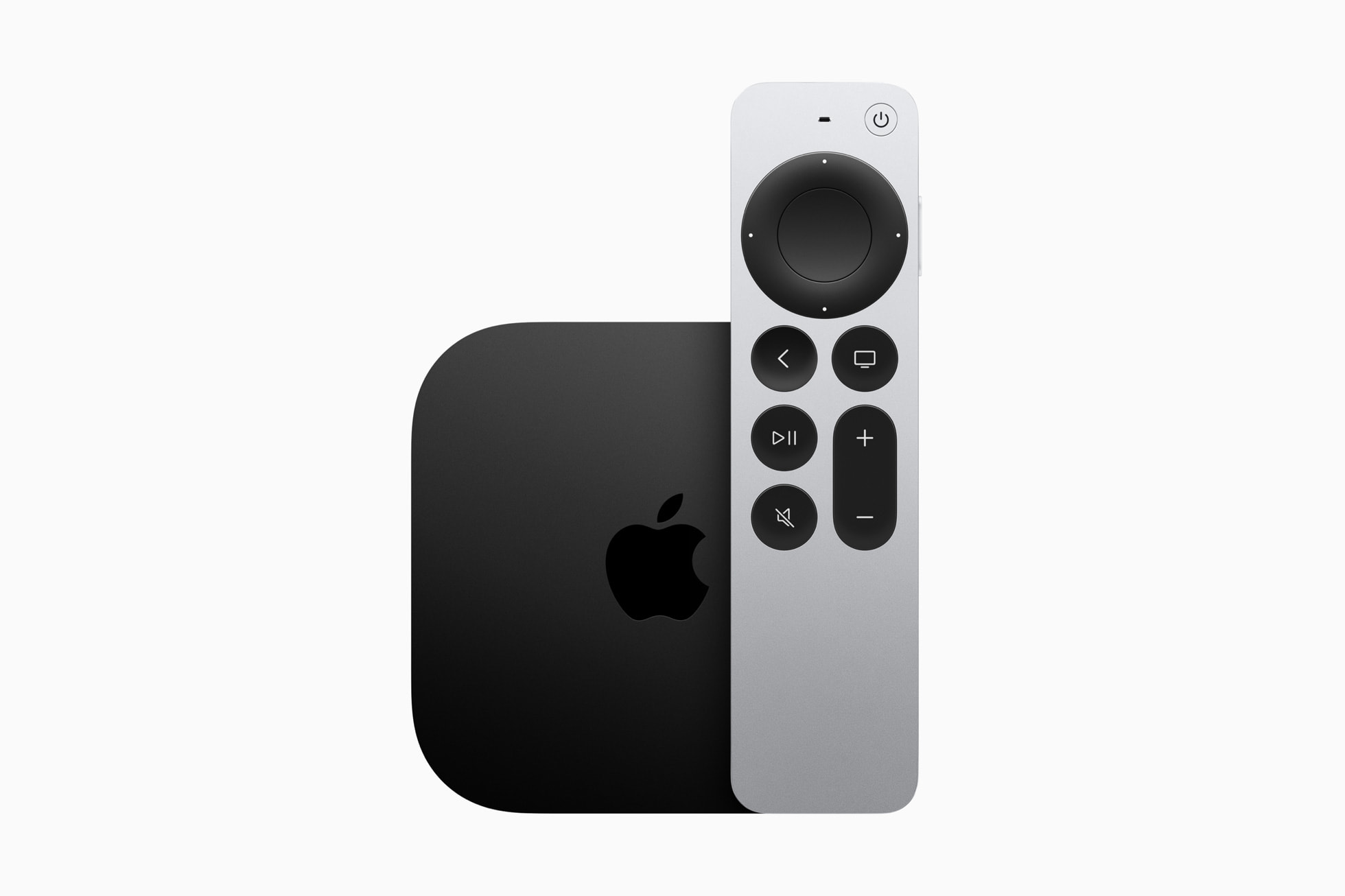
It’s an adorable tiny box, with a couple of ports on the back. It sits happily on my self and doesn’t draw attention to itself. Which is exactly what I want from a box in my living room.
A black Apple T.V. with a silver remote next to itSource: Apple. I actually have it in silver, which i think looks better.
The remote is a lovely bit of machined metal with some nice clicky buttons. However, some smart person decided to make the large middle multi-directional button also a touch pad. So as you brush your thumb across it to select a show, it’ll suddenly go crazy and send you two pages away, or sweep upwards, or something totally unexpected. It makes it near impossible to use, and would have made me return the entire device IF there hadn’t been a setting to disable it. Once disabled the remote is perfectly functional, and rather nice to hold. The battery lasts ages, and is USB-C. I’ve charged it once in 8 months of ownership.
But wow, that touchpad was almost a deal breaker. What an awful design choice.
Air Pod Pros 2
Fit well and has good battery life. Pretty low bar. Where they shine is the ANC. Almost on par with my Bose Quiet Comfort 2’s, but are much more portable. I’ve stopped taking my big headphones on trips to London to save on weight and packing space.
It’s not all rainbows however. The actual case wants to slip out of your hands and jettison the buds at every chance it gets. They’re also not water resistant, so need to be a little careful running in the rain. You also can’t fix them / replace the battery.
Finally, the weird little touch pads on the side aren’t super easy to use. I’d have preferred real buttons to rubbing them to achieve something. It looks weird to rub them. And it makes me feel weird doing it.
Apple Watch SE 3
It’s fine? It’s a little heavy, but you could also say “sturdy”. Its scratch resistant, and seems to handle being dunked in the pool a few times a week. The “digital crown” is a nice touch.
The strap too (i have a rubber blue one) is nice for both causal wear and exercise.
Charging too is nice. It comes with a little magnetised pad you drop it onto. The battery lasts almost 2 days, and getting a full days charge takes around 15 minutes.
It’s got a few bells and whistles regarding sensors; it can tell you when pinch your thumb and forefinger together or flick your wrist up. It’s got a heartbeat sensor that works in water too. I also like the actuator motor that give it nice vibrations. More like a pulse than an annoying buzz.
Mac Mini M4 Pro
Easily one of the best bits of hardware I’ve bought in years. Similar to the Macbook Air, I’d recommend one of these to anyone who’s looking for a desktop machine (though not if they want to play games). It rarely gets warm, sips power, and I’ve never once heard the fan. The size of it is also something to behold. It’s rather pointless that I can fit it in the palm of my hand, but somehow that’s also part of it’s charm.
Would I like some more ports? Sure. It’s why within a week I paired it with the UGreen Mac Mini Dock, which so far has been great. This dock also solves the only other gripe I have: the power button.
Whatever bright sausage decided to hide it under the machine is clearly being paid too much. I wonder if it’s the same person who decided the Apple T.V. remote needed to also be a touch sensor?
Either way it’s bonkers and silly. But in reality it’s very much a non-issue.
Honourable mention; Macbook Pro 2019
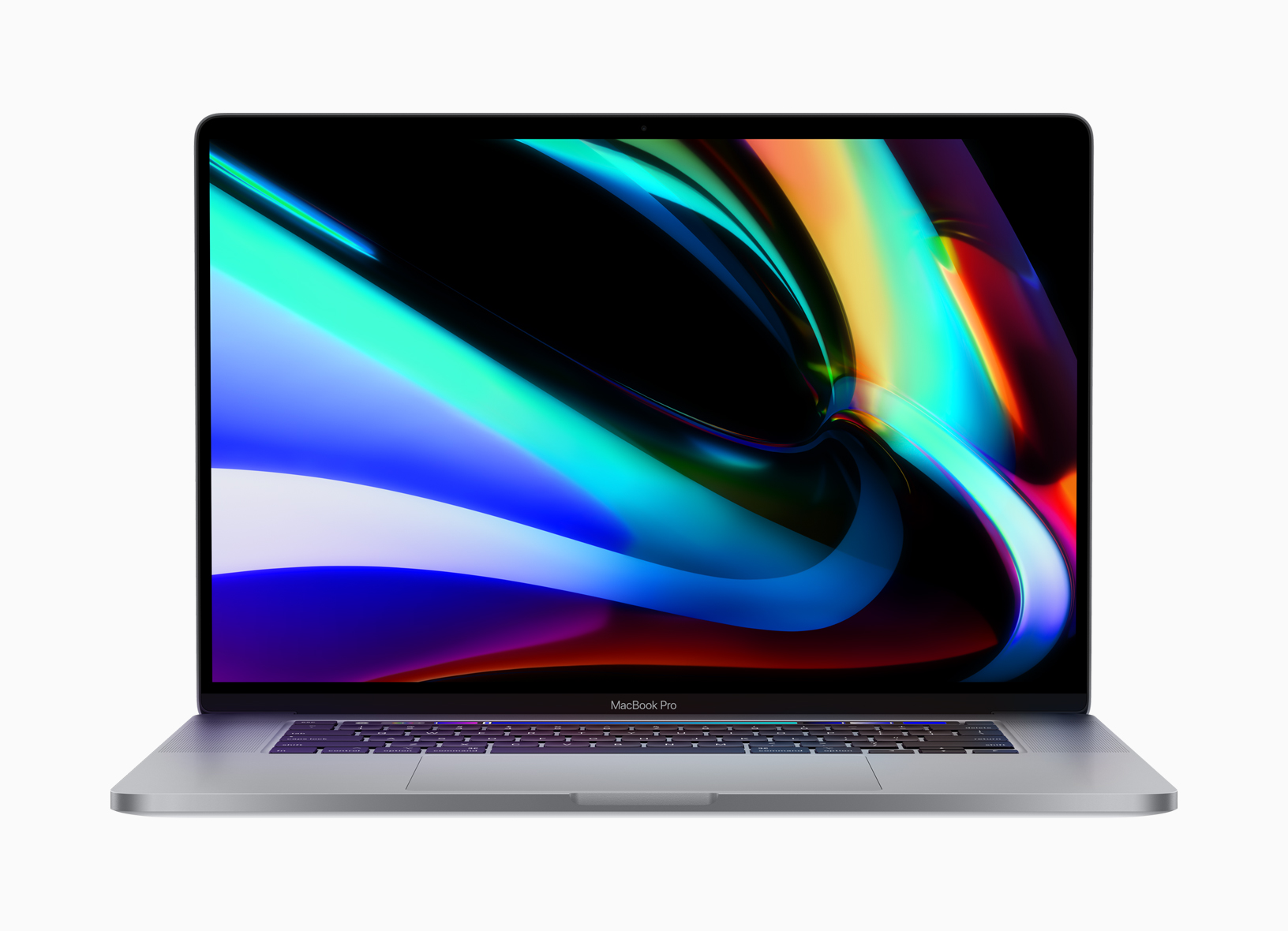
I’m going to bring up my work laptop. Its a 2019 Macbook Pro with an Intel processor and Butterfly Keys. And it is terrible. It’s been terrible since the day I was given it.
A 16 inch Macbook pro, facing at the userSource: Apple
Sitting at roughly at 60’c while running idle, it’s almost impossible to use as a laptop, as your hands get uncomfortably hot and sweaty after only a small amount of use. And that’s having it on a desk, let alone your lap.
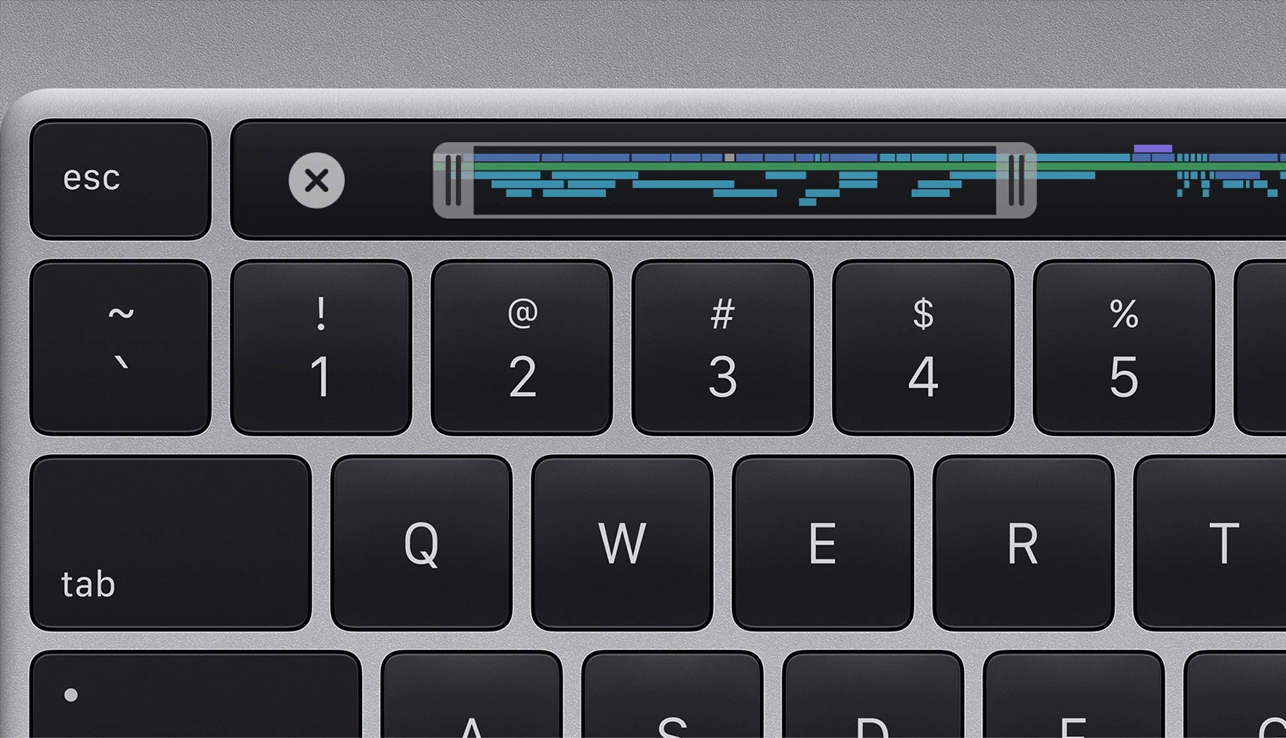
Not that you’d actually want to type on the Butterfly Keyboard. The total lack of travel makes for a pretty horrid experience. Your fingers hurt after a while from essentially tapping on metal chassis. Pair that with the heat, and it’s just a thoroughly unpleasant experience.
The touchbar and some of the keyboard, as seen from aboveSource: Apple
The number of ports is also a joke. Four UCB ports and that’s your lot. But as you charge it via a USB-C slot, you’ve actually only got 3. Speaking of charging; don’t charge the laptop from the left hand side. Due to where the CPU is placed charging the device will result in it getting extra warm, so you’ll end up CPU throttling. I’ve even had it shut down mid programming task due to heat. Yep, charging your device will result in worse performance.
The less said about the catastrophe that is the Touch Bar, the better.
The majority (if not all) of these issues were resolved when Apple released the M1 version of these laptops that redesigned the form factor.
Friends don’t let friends buy or own a 2019 Macbook Pro.
End of Part 1.
So that’s my brief run down of what I think around Apple hardware from a year of use. Ultimately, pretty gosh darn great. Very little out there is so consistently well designed, and pleasant to use.
In Part 2, I’ll be diving into the software. Specifically, the OS’s that these run like iOS and MacOS, but also specific Apple applications like Music and News.
Currently I use yarn 1.22.22 - a rather dead old version of Yarn. It was discontinued in 2023 (ish), but from what I can tell it’s still widely used by a lot of the FE community.
However, since Node 24 I’ve started to get this depreciation warning:
[DEP0169] DeprecationWarning: `url.parse()` behavior is not standardized and prone to errors that have security implications. Use the WHATWG URL API instead. CVEs are not issued for`url.parse()` vulnerabilities.
So, this got me thinking about possible replacements to Yarn. Initially, I looked at PNPM (which I think is the forerunner, but this blog isn’t about PNPM) as a replacement, but i kept seeing references to Corepack no matter what package manager I looked at. Which got me thinking:
What is Corepack? And why is it everywhere?
After reading through the documentation, I found myself rather confused. But, after battling through and messing around, I feel like I have a good handle on it. So this post is for those of you who are also lost and confused with Corepack. I hope these words will help.
So what is Corepack?
Let’s cut to the core (pun intended) of this. On it’s GitHub repo, it states:
In practical terms, Corepack lets you use Yarn, npm, and pnpm without having to install them.
Which confused the crap out of me. Are there generic Corepack commands that wrap generic install commands? Does it install things for you? I’ve always installed package managers. Or my project has come with scripts and binaries to run (e.g. gradle + gradle wrapper).
But the crux of it is; you place
{
"packageManager": <your manager>
}
at the bottom of your package.json, and Corepack will install it and make it available for you to use automatically. No need to download and install specific versions of package managers. They just appear available.
Which, to be fair to the above description from the Github, it does state.
Essentially, all it does is make sure you’re always using the same package manager and a specific version for a project. As it’s defined as part of the package.json, every person who downloads your project (and uses Corepack) will get the defined package manager. That’s pretty great, and should solve some weird build time bugs.
Where does (some) of the confusion come from?
Now we know what Corepack actually does, why is it confusing?
Well, for starters it doesn’t replace your package manager. You still define what package manager your project uses, and use the manager specific commands like yarn start etc.
Next, it’s still technically experimental. Which for any developer signals “here be dragons”, and puts you off using it for production use*. However, it’s been bundled with NodeJS since version 14 which was released 5 years ago. And has lived with the project’s documentation since. How can something be experimental for that long, but also suggested to use by the major package managers? Huh?
However, since NodeJS version 25, it won’t be bundled. So you’ll need to download and install Corepack yourself. That’s… more confusing? Is it still experimantal? I don’t know. But the GitHub project doesn’t suggest it is and it’s ready for prime time.
Ultimately if you do want to use it you still have to call corepack enable. It’s not enabled by default. And if you also have to install too… It’s a bit of a confusing mess.
Wrap up
I think ultimately I like what Corepack is trying to do. Having projects define the version of package managers to use and then automatically download them is rather neat. It should solve weird bugs where one team member or CI server is using a different one to you. That’s a real problem and it’s nice it’s been solved within the NodeJS ecosystem.
However the “marketing” around it, from the perspective of someone who’s not super deep into the world of JavaScript package management, is overly complex and seems rather confusing. It’s been almost 6 years of Corepack, and yet it still seems like an oddity or an added extra. I wonder it no longer being bundled with NodeJS will help? Maybe it’ll be able to fly as it’s own thing. I guess we’ll find out.
*As with all things in development, this isn’t a hard or fast rule. If you have a fully operational Platforms team that are happy to maintain cutting edge tech, then go for it! But for small shops, or one-man-bands, I’d personally recommend avoiding “dragons”.
Last year I wrote a Looking ahead into 2025. It contained some personal aspects and predictions. And here I am again to do it again for 2026!
Personal
2025 was certainly a year of moving forward. This year is no different and there’s quite a lot on the horizon; from starting a family, to buying a house, and getting married. It would be amazing to achieve all three, but just one of them would be great. They’re big things and life is complicated. So I’m not putting any pressure on those (other than attempting to move them all forward).
But I have set some goals…
Goals
As with all goals, they should be:
Measurable
Achievable
Specific
With that in mind, I’ve got two goals I’m keen to attempt to achieve this year:
Write at least twelve blog posts within the year
Actually release my Big Project
I enjoy writing, and last year I set myself a far too ambitious goal. So this year, I’m lowering the bar and making it much more possible for me to achieve. Why twelve? Well, that means on average I’ll have to write one a month. If I write more multiple in a month, and I get to busy another, then yay! I’m still on the road.
As for the Big Project - I’ve been working on it for almost a year now and it’s almost time for folks to see it. I can’t write much more than that right now. But I like this goal, as while it pushes me to deliver something; it doesn’t have any expectations attached to it. No financial results or usage targets etc. Maybe that’ll come next year. But right now, just getting it in front of people is the important part.
Predictions
So last year I broke my predictions down into two categories (tech & politics) with three predictions each. I got around 3(.5) of the predictions correct, so lets see if I can improve on that this year!
Tech
2025 was a mess for tech. A.I. got even bigger and swallowed so much of the available capital and brain space. On top of this we had tariffs (thanks Trump), AND we had a load of legal battles with big tech. So 2026 is going to be an… interesting year.
The year of A.I. Trailers / adverts - I think this year we’re going to get hammered with trailers / adverts for t.v. shows and products. And NO ONE is going to like it. I also think that by the end of the year, companies will start to wind down their experiment with it. It started this year, and got a lot of backlash.
Apple will release a folding phone, and it’ll cost >£2,200 - an easy prediction, as it’s on a lot of other peoples prediction list. But I’ve added extra spice by stating it’ll be above £2,200. And if it is… Very few people will buy it. Which might be exactly what Apple expect.
Bluesky will fizzle, and you’ll start seeing adverts - I think Bluesky has carved out a nice little niece for itself. However, it’s explosive growth has ended. At some point, the bills have got to come due. I expect them to introduce some kind of advertisement tier. And personally I hope this causes more folks to jump to Mastodon, my preferred social media site
Political
I don’t need to tell you politics was a sack of cats this year…
Starmer will still be in number 10 - this is a bold take, as the sharks have been circling. While I’m not happy with Labour, I don’t think a change of leadership will change anything - and I suspect everyone most people in Labour thinks this too.
The Conservatives will surge while Reform stands still - I think once The Conservatives ditch Kemi Badenoch (which i believe will happen soon), I think they’ll pull the Centre Right back to their party, while Reform continues to flounder in actual government (see - Kent Council) and is just too divisive for the “middle” voter.
Trump and Republicans will have a falling out - Well, more they they have already. But with the mid-terms coming up, and cracks showing in the Trump brand, I think we’ll start to see some spines being regrown. Don’t get me wrong these regrown spines won’t be used to help their constituents, it’ll be more for job preservation + reelection.
I wish you luck and fair weather for 2026
And with that I shall leave you to ponder what 2026 might bring your way. Whatever it does bring, I wish you health, wealth, and happiness.